Influences On How You Interpret Data

The purpose of collecting and analyzing data is of course to use it, but before data can be used, it is necessary to interpret the data and draw conclusions based on the study conducted. Many things influence how data is interpreted and by extension, how changes made based on the data is, or isn’t, implemented.

Bias is one of the ways in which data might be influenced in a way that can change its interpretation. Bias occurs when the results of a study are in some way distorted based on a variable that isn’t accounted for in the tests. Often, bias comes from the ones conducting the tests, and thus, the results can reflect the personal beliefs of the ones performing a test. For example, an evaluator may ignore certain problems that they themselves deem unimportant, or unknowingly influence an interviewee to respond in a certain way based on the phrasing of questions or the tone of voice in which the questions are delivered. In that way, Bias can not only effect how one interprets data, but can also effect what data is gathered in the first place.
There are, of course, other influences on how data is gathered and interpreted, but I believe bias is one of the biggest and most harmful influences. Eliminating bias in studies is essential to ensuring the integrity of the data one collects, and ensuring that the data decisions are based on is as accurate as possible, so that changes made to the product are effective and and will improve the functionality and usability of the product for all intended users, rather than missing changes the product might need, or including things that make the product harder to use for a portion of users.

References

Preece, Rogers, & Sharp, (2015). Interaction Design: Beyond Human Computer Interaction. West Sussex, United Kingdom: John Wiley & Sons, Ltd.
Design Patterns

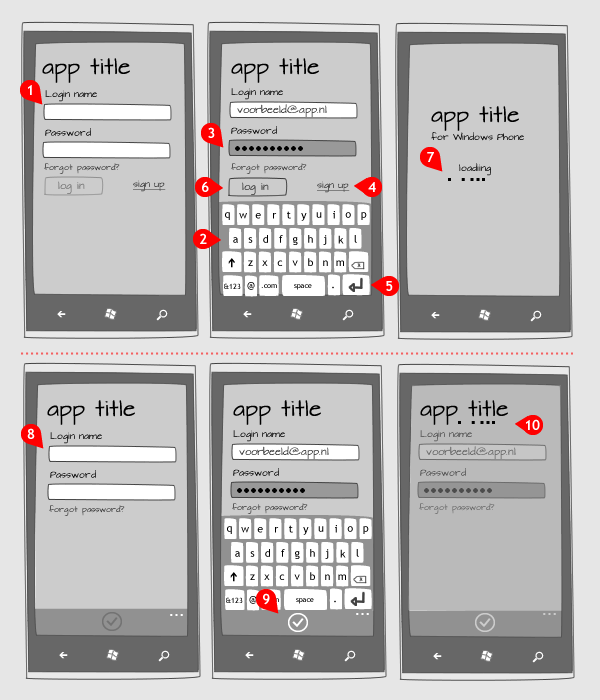
Design patterns are a way for designers to describe the design experience and share that knowledge with other designers as well as providing a vocabulary for different aspects of the design process and the experiences that designers wish to create with their design, and with this, document the design process in a meaningful way.

Generally, a pattern is meant to be a solution to a problem, but with situations provided in which the solution has worked before. That being said, patterns should be generally flexible, and should be able to be used or at least implemented in a variety of ways.

Patterns in interaction design are not incredibly common, but have been growing more popular, and there are a few pattern collections for designers who are interested, and can be helpful as the patterns are tested solutions to the problems many designers face. A lot of pattern collections are associated with software components that designers can use without having to implement a great deal of modifications.

The way patterns work reminds me a bit of the way music theory and notation works for musicians. Of course any musician can think of a melody in their head, and many of them can translate that into notes they play, but without notation and music theory, it can be very difficult for them to communicate those ideas about the music they have in their head or that they wish to play, and the same can be said of designers. A designer may have all the ideas for a design in their head, but without the vocabulary to communicate that idea and work with other designers it can make the design process very difficult and can mean that it’s harder for interaction design to be an iterative process where all designers get better as advancements are made, and trends emerge if there is no way for those advancements and trends to be communicated.

References

Preece, Rogers, & Sharp, (2015). Interaction Design: Beyond Human Computer Interaction. West Sussex, United Kingdom: John Wiley & Sons, Ltd.

High-Fidelity Prototyping

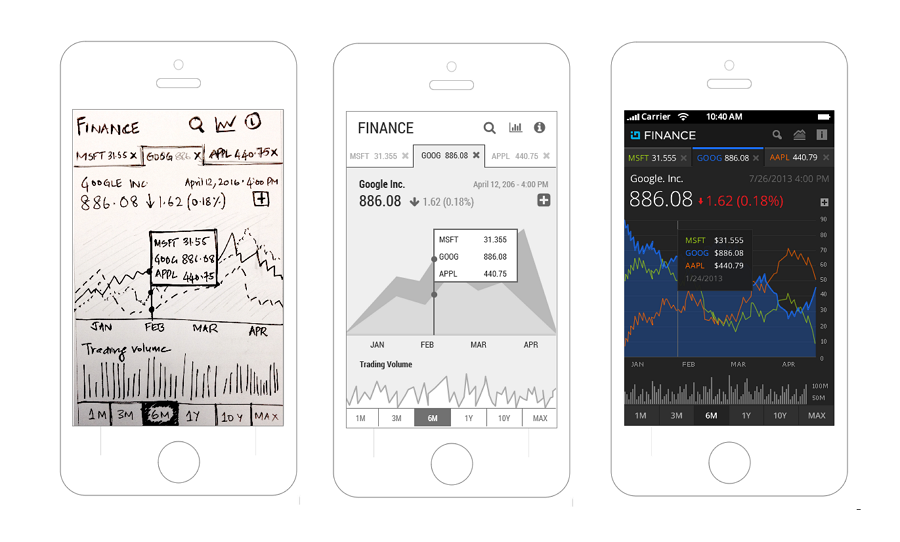
A high-fidelity prototype is one that mostly looks like the final product will look, and usually offers more functionality than a low-fidelity prototype, usually a very basic, working software version instead of a paper-based mockup. However, a more mechanically functional or detailed model might be considered higher fidelity than say, a rough, static model made with little detail. Fidelity is a sliding scale, and some prototypes are higher or lower fidelity than others.

High-fidelity prototyping is useful for a variety of reasons. First and most obviously, it gives test subjects a better idea of what the final product will actually look like, and how it might actually function. With this context, participants should be able to provide more useful feedback, that can be framed in the context of how the suggestions would be implemented in the final product considering what has already been implemented.

Testing using high-fidelity prototypes can also point out flaws in the physical or technical design of the product as it might be in its final form, and highlight any possible challenges in producing a final product that fulfills the requirements of the project.

I personally think high-fidelity prototypes are the most useful for testing. It is hard as a test participant to provide useful feedback when you don’t actually know how the final product will look, or function. That being said, it’s understandable that often, high-fidelity prototypes are expensive to produce and it is not feasible to create them until later in the development process. In a perfect world, teams would always have the time and resources to create working high-fidelity prototypes, because they are often the most useful, but realistically, while they are an important part of the design process, they should be used in conjunction with other prototyping methods to produce the best results for a project.

References

Preece, Rogers, & Sharp, (2015). Interaction Design: Beyond Human Computer Interaction. West Sussex, United Kingdom: John Wiley & Sons, Ltd.

Establishing Requirements

When designing a product, it is important to understand the scope of the project and what you are actually attempting to accomplish with your design. In that regard, one must determine the exact requirements of the design, in order to focus their efforts and avoid a design that attempts to do everything while not actually accomplishing anything.

So the process of establishing requirements then has two major goals: to understand the users and why they need a product, and to set out a foundation of requirements that will help keep the design process focused.

Carrying that theme, there are also typically two kinds of requirements to consider during the the design process, functional and non-functional requirements. Functional requirements are ones that outline what the product should be able to do, while non-functional requirements are ones that act as restrictions or describe the constraints the product must be built within. For example, a functional requirement of a phone is that it must be able to send and receive phone calls and text messages, while a non-functional requirement is that the phone must be ready for mass production within the next year.

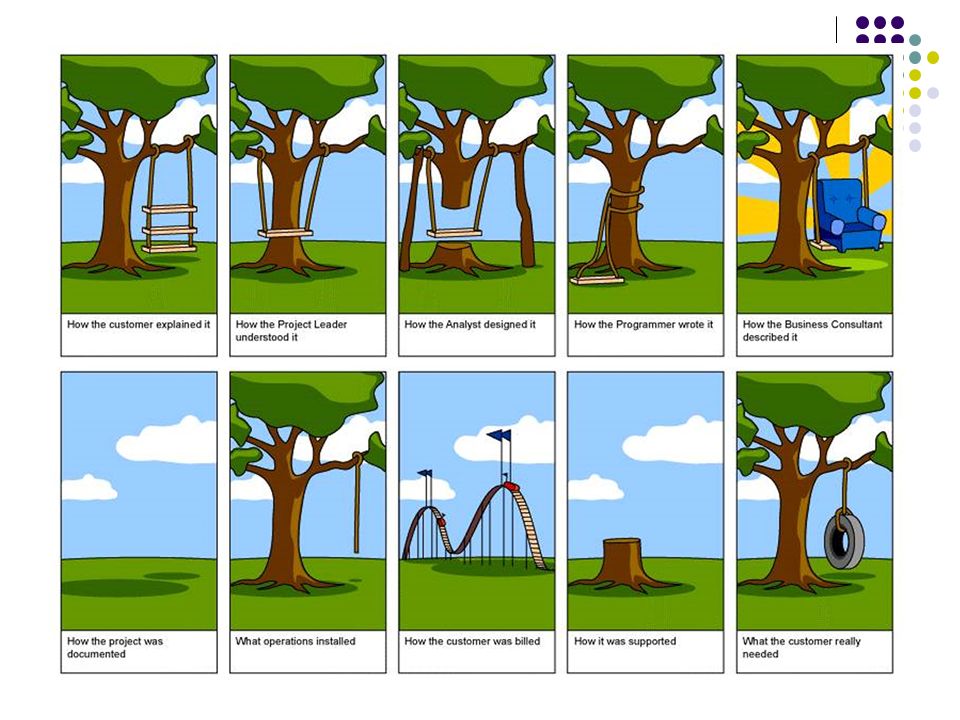
As the graphic above shows, everybody working on a product being on the same page with the requirements is important, to avoid situations in which customers are disappointed, investors are misled, programmer’s efforts are wasted, and ultimately the customer’s needs are not fulfilled. I think that before any design can actually begin, the requirements of the product should be laid out in terms that are understandable, and in a way that everybody can agree with, otherwise resources are wasted, customers are potentially lost, and all parties involved are left with a worse situation than what they started with.

References

Preece, Rogers, & Sharp, (2015). Interaction Design: Beyond Human Computer Interaction. West Sussex, United Kingdom: John Wiley & Sons, Ltd.

The Value of Prototyping and User Involvement

Prototyping allows you to test your design on the users who might interact with it on a daily basis, and who will provide the best feedback as to what changes would actually improve the design of the product. Involving Users is one of the best ways to improve your product and gather valuable data about the design of your product.

That being said, a proper balance of user involvement is required in order to ensure the best results possible and to guarantee the integrity of your ideas for the product. In the famous words of Henry Ford, “If I had asked people what they wanted, they would have said a faster horse.” Often times it can be hard to innovate if users are working too closely with the development of a project, as users often think in terms of how things are currently done, and may have trouble imagining new ways for things to be done. That is why a balance is important, to ensure that even with innovation and vision for all the changes that might be coming along with the new product, the product remains familiar and usable enough for users to adapt and for it to work for them in their daily tasks rather than against them.

In all cases, designs should not be made in a perspective bubble, regardless of whether that perspective is the designer’s or the user’s. Input from multiple sources, and the proper execution of ideas is what makes designs successful.

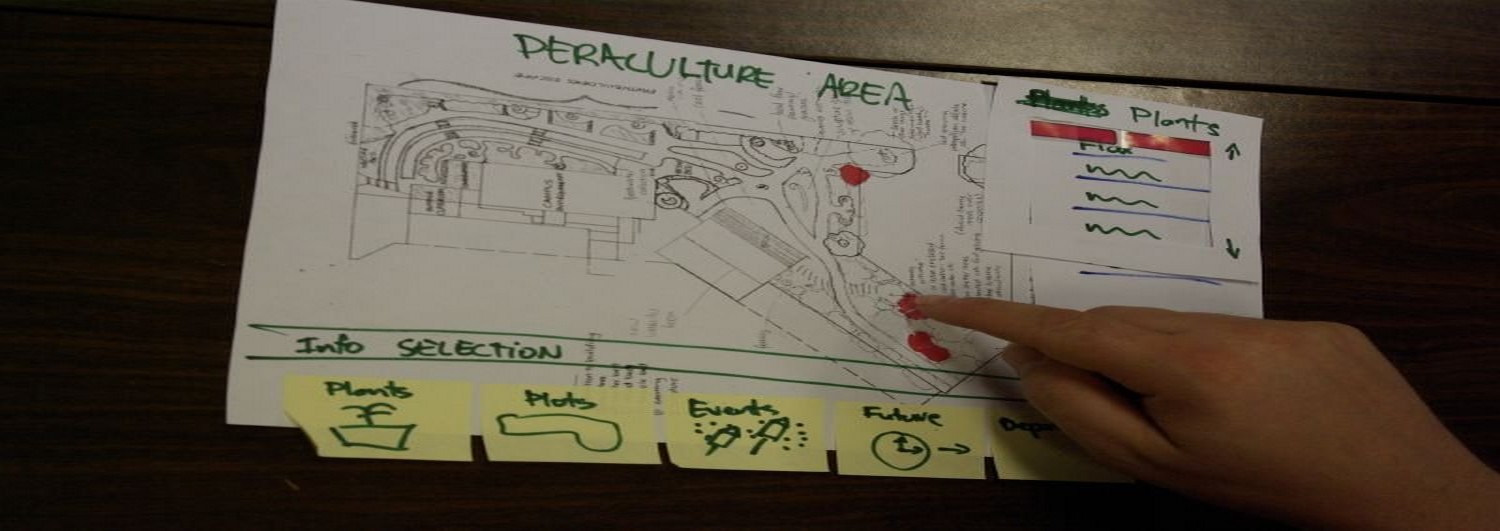
An example of a low fidelity prototype used to indicate a general idea of what the design of a product might look like.

Prototyping is one of my favorite parts of the interaction design process. I enjoy hands on activities, and making a mock up of what the design might look like is the point at which the work you have done up to this point begins coming together in a tangible way that you can share with others and get feedback on. Whether the testing confirms my ideas of what I thought would work well as I was designing the product, or whether it contradicts the ideas I had, I find the testing valuable as it makes me grow as a designer and allows me to learn how I think differently from potential users, and illustrates the value of bringing in perspectives that don’t necessarily line up with mine while working on a project.

References

Preece, Rogers, & Sharp, (2015). Interaction Design: Beyond Human Computer Interaction. West Sussex, United Kingdom: John Wiley & Sons, Ltd.


Presenting Findings

Regardless of what data you are collecting or how you are collecting it, you will have to present the findings, and how you present the findings can be dependent on a number of different factors including the purpose of the study and who the audience you are presenting the data to is made up of.

Specific notation used to report findings using specialized syntax and semantics is often a way of efficiently conveying the information you wish to present if your audience is one that is familiar with the vocabulary and conventions of your field, or of the field that is the focus of the study you were conducting.

Many will naturally gravitate towards using stories to present the findings of their studies when it is an appropriate fit, as it is a fairly intuitive way for us to convey an idea, or a desired experience. Anecdotally, you can find the entirety of Mad Men as an argument for how storytelling can be a very moving method for presenting the ideas confirmed by data gathered in studies. Regardless of the format in which you choose to report your findings however, it is important to effectively and efficiently summarize your findings in a way that is easy to understand and that allows you to get straight to the point of your study without including extraneous details of the study, and use your time to improve your product, rather than attempt to properly communicate data and ideas that aren’t even relevant to your goals.

Personally, presenting data is one of my least favorite parts of gathering data, however I do recognize its importance to the process of gathering and analyzing data as well as to the process of interaction design. Learning how to efficiently and effectively present findings is something that all industry professionals should at some point learn to do, and its value cannot be understated as it is one of the main ways to have your ideas and opinions represented in the final design of any product you are working on in a team.

References

Preece, Rogers, & Sharp, (2015). Interaction Design: Beyond Human Computer Interaction. West Sussex, United Kingdom: John Wiley & Sons, Ltd.
Enriching the Interview Experience

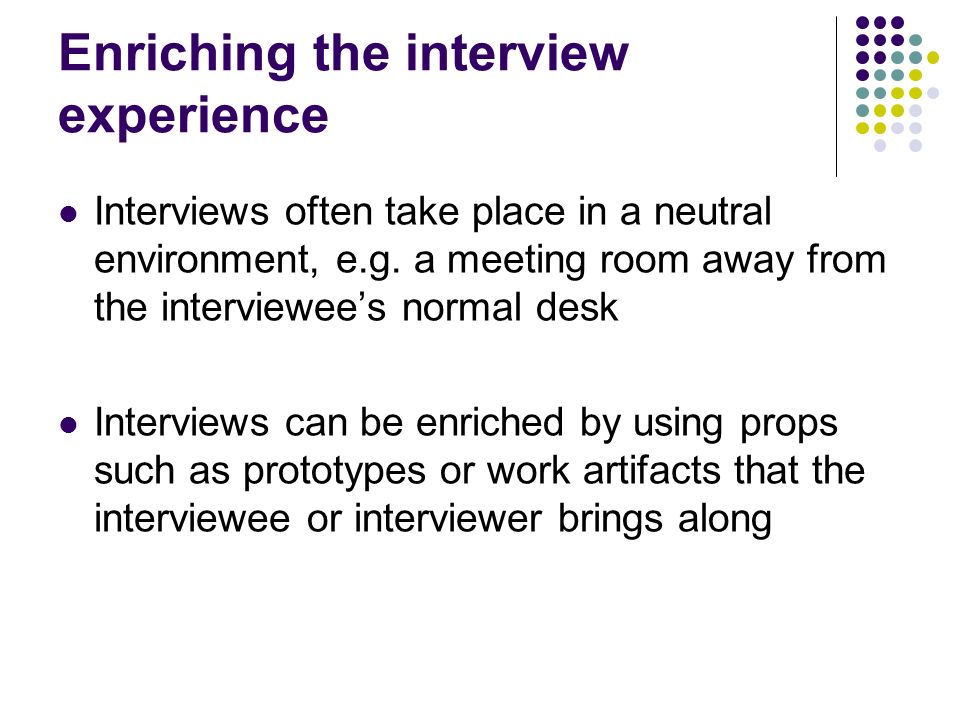
The act of enriching the interview experience is the process of making interviews more interesting for interviewees by grounding it in a specific context, and hopefully through that process increasing the value of the feedback received during the interview. Interviewers can enrich the process through the use of prototypes or other props.

This portion of the interviewing process is vital, because without it, it can be difficult to get useful and thorough answers from participants when they are not comfortable, or not engaged. Without proper data gathering, the design process can easily fail, and feedback is one of the key things to focus on to avoid that.

Along with engaging interviewees, using a prototype also provides context to any feedback you get through the interviews. Concrete answers tied to specific tangible problems that the interviewees have in front of them when providing their answers can provide some of the most useful feedback during the interview process as it allows the interviewees to point out on the prototype what issues they had with the design during the interview, and allows the interviewer to direct them towards providing more thorough answers.

When interviewing in a neutral place, grounding the interview in context can help to encourage participants to provide more valuable answers

I personally think making the interview process more engaging and comfortable for interviewees is one of the most important things one can do when gathering data. Before gathering data or designing a “perfect” product, interviewers have an ethical responsibility to their participants, and anything the interviewer can do to make the experience better for the interviewees providing one of the most valuable corporate resources in the form of data is something that should be a priority for the interviewer. Interviewees are very often participating voluntarily to provide a company with feedback that makes that company’s product better and should be treated in a way that reflects the value they provide.

References

Preece, Rogers, & Sharp, (2015). Interaction Design: Beyond Human Computer Interaction. West Sussex, United Kingdom: John Wiley & Sons, Ltd.

Command-Based Interfaces

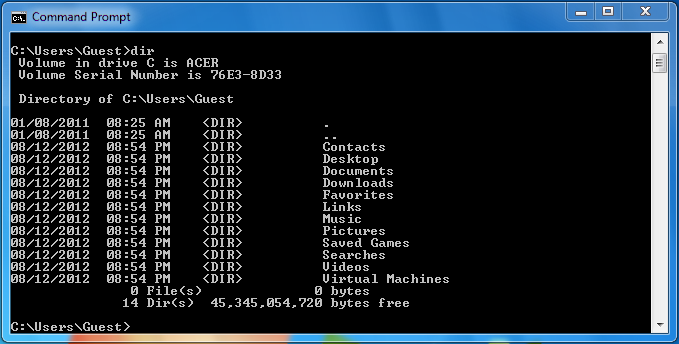
Command-Based Interfaces are computer interfaces that rely on commands to be typed in by the user when prompted in order to yield results. In many PCs, this is known as the Command Line Interface, as opposed to the Graphical User Interface, in which the user interacts with graphic displays in the forms of icons, menus, and other shortcuts that allow the user to interact with the interface using the mouse and a monitor.

Despite the overwhelming popularity of GUIs among the general population due to how easy they are to use, many professionals prefer to use command based interfaces with certain technologies if it allows them to work faster and more precisely than the graphic, menu based interfaces many softwares offer. Often, professional software will use a heavy mix of graphic interfaces and keyboard shortcuts in order to streamline the workflow, and present the user with the strongest points of both the Graphical Interface and the Command-Based Interface. (Preece, Rogers, & Sharp, 2015, p. 160)

A Command Line Interface for a Windows machine

Personally, while Graphic User Interfaces are obviously the most intuitive and easiest to use for a majority of the population, I feel that in our rush to improve the quality of GUIs, we leave behind that portion of our population that is visually impaired and not able to interact with GUIs. With technology being such an integral and unavoidable part of our society, I believe that part of our responsibility as designers is to accommodate for people with disabilities. The most amazing technology will always dull a little for every person that is left unable to use it due to lack of consideration for accessibility.

References

Preece, Rogers, & Sharp, (2015). Interaction Design: Beyond Human Computer Interaction. West Sussex, United Kingdom: John Wiley & Sons, Ltd.
Expressive Interfaces

Expressive Interfaces are interfaces that make use pleasing aesthetic design as well as efficient use of space and various forms of feedback in order to deliver a satisfying user experience.

Expressive Interfaces are a critical component of modern designs, with such a wide variety of choices for consumers, companies that want their products to be successful must not only lower the barrier of knowledge needed to operate their systems, but also make their systems desirable to use (Preece, Rogers, & Sharp, 2015, p. 139) . Many companies in the consumer electronics industry have focused heavily on this aspect of design, and today’s smartphones are one of the current pinnacles of expressive interface design.

Expressive Interface design can be achieved in a number of ways, that modern designs typically use several of to create a cohesive and satisfying user experience. Dynamic icons such as the recycling bin on a computer desktop changing based on the amount of deleted files within it, or icons with text bubbles indicating the number of unread messages on smartphones are both good examples of dynamic icons that convey useful information in an unobtrusive but efficient way (Preece, Rogers, & Sharp, 2015, p. 138). Another way in which smartphones make use of good expressive interface design is vibrotactility in their feedback, having the phone vibrate when you press keys on the digital keyboard to simulate the feedback you get from typing on a physical keyboard and specific vibration patterns depending on the notifications being received are examples of this.

Being interested in Game Design, efficient and visually appealing design is very important to what I want to do in future projects, building off of research that has already been done, and industry standards that have already been established will be important. When playing games myself, the ways in which the game lets me know what’s going on without having me sort through useless visual information has always been something that has stood out to me, and well designed user interfaces are very satisfying to use. Overall, I think it’s important to find a balance between feedback, so that it effectively conveys information without being obtrusive, and seeing how that balance is being struck as interfaces trend towards flat, visually simple and minimalist design is very interesting.

References

Preece, Rogers, & Sharp, (2015). Interaction Design: Beyond Human Computer Interaction. West Sussex, United Kingdom: John Wiley & Sons, Ltd.

Ephemeral Messaging

Ephemeral Messaging is the developing concept of multimedia communication with a built in expiration date. Messages sent through apps that use ephemeral messaging disappear after a short amount of time, that the users can usually set.

To extend the life of these messages, some of the apps allow you take screenshots, however even that is beginning to fall out of popularity as Confide doesn’t allow screenshots within their app (Confide, Your Confidential Messenger, n.d.). Apps that make use of ephemeral messaging such as Snapchat, Wickr, and Confide are growing in popularity among younger generations (Preece, Roger, & S, and with the eternal conflict between curious and adventurous teens and their parents it’s easy to understand why, but there are potentially larger implications moving into a world with more and more data concerns, and it’s easier to see why more and more are turning to untraced forms of communication. Clearly, the best (and most successful) designs in technology are the ones which fill a need people have, and this trend within technology shows the growing attitude of caution with regards to large corporations and how available your data is to them, both in terms of them selling it, or potentially using it as grounds for denying or terminating employment.

For myself, I can see in today’s current political climate and the state of privacy laws with regards to tech how one’s data could easily be used in a malicious way against them by entities such as the large corporations collecting the data as well as by governments showing a worrying trend towards using private data to track and harass marginalized people. To this point, I hope that the growing popularity of apps that use ephemeral messaging will cause the corporations controlling the more readily available and mainstream forms of communication to reevaluate their policies regarding data collection and what they retain the rights to distribute in the interest of protecting consumers, especially those marginalized by the societies in which they exist.

References

Preece, Rogers, & Sharp, (2015). Interaction Design: Beyond Human Computer Interaction. West Sussex, United Kingdom: John Wiley & Sons, Ltd.

Confide, Your Confidential Messenger, (n.d.) Retrieved from https://getconfide.com/